Emulate the Amazon Bedrock Runtime API Locally Using MiniStack and Ollama
S L Manikanta
Jul 11, 2026 • 7 min read
list On this page expand_more
- 1. How MiniStack Emulates Amazon Bedrock
- 2. Prerequisites
- 3. Step by Step Implementation Guide
- Step 1: Spin Up Your Local Model with Ollama
- Step 2: Start MiniStack with the Proxy Configuration
- Step 3: Develop Against a Local Bedrock Compatible Endpoint
- 4. What Can You Develop and Validate Locally?
- 5. Limitations of Local Emulation
- 6. Frequently Asked Questions (FAQ)
- 7. Going to Production
Want to build production-ready AI?
Subscribe to StackMindset to receive actionable systems engineering checklists and code walkthroughs. No spam, only technical insights.
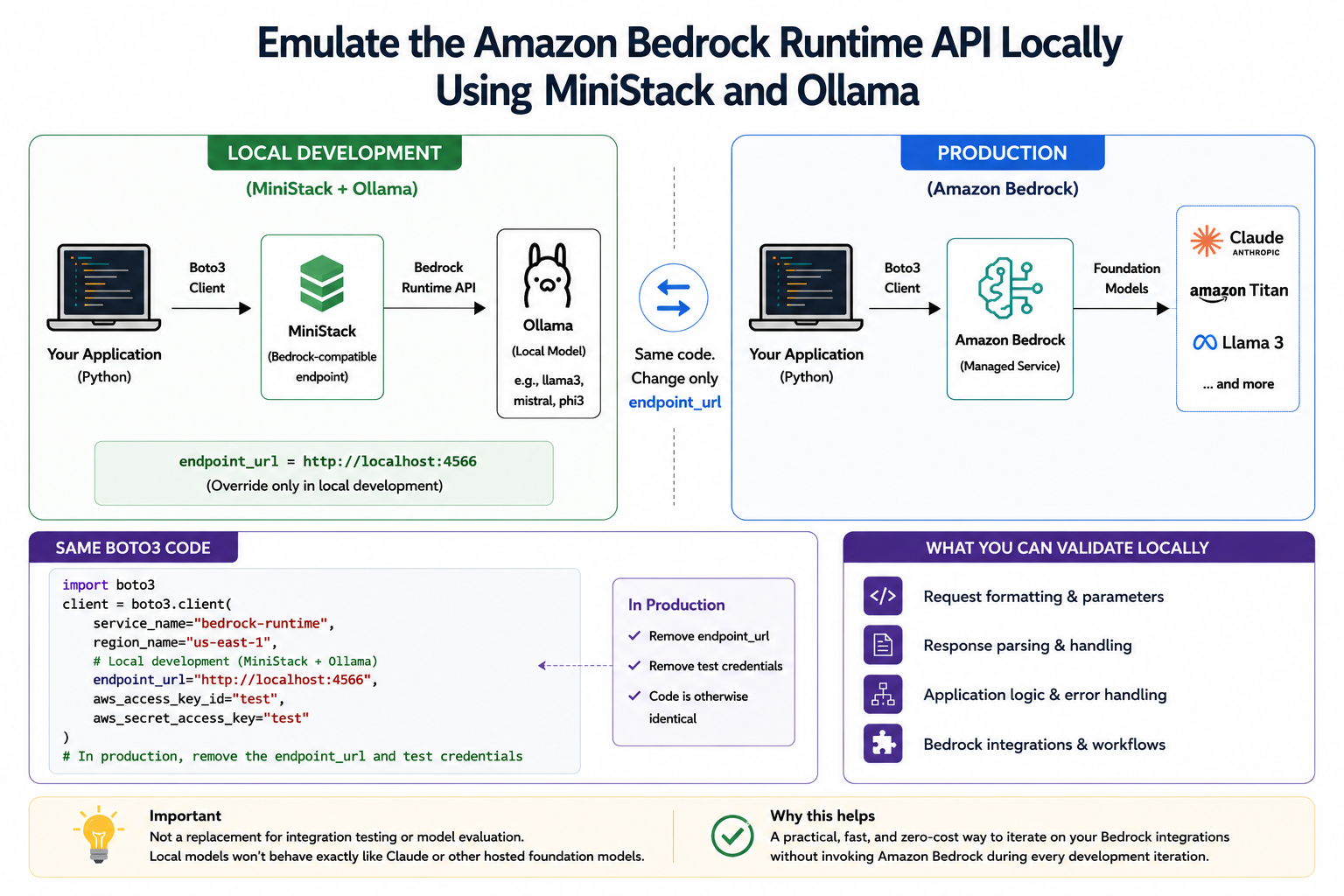
Developing generative AI applications against cloud hosted Amazon Bedrock can introduce unnecessary friction into the development cycle. Every time you validate request handling, test structured outputs, debug application logic, or experiment with prompts, your application must invoke a remote Bedrock model. That means dealing with AWS credentials, environment configuration, and billable model invocations even when you’re only trying to verify that your application code behaves correctly.
MiniStack v1.4.0 addresses this by providing a free AWS emulator. By running MiniStack alongside Ollama, you can execute standard Amazon Bedrock Runtime API calls through the Boto3 SDK against local models. The result is a fast, local development environment that lets you iterate on your application without calling Amazon Bedrock during routine development.
MiniStack is not a local implementation of Amazon Bedrock. Instead, MiniStack exposes a Bedrock compatible Runtime API. It accepts standard Amazon Bedrock Runtime API requests, translates them into Ollama compatible requests, then translates the response back into the Bedrock response format expected by Boto3.
1. How MiniStack Emulates Amazon Bedrock
To emulate the Amazon Bedrock Runtime API locally, the architecture relies on three components:
- Ollama: The inference engine hosting local models (e.g., Llama 3, Qwen) and exposing an OpenAI compatible API.
- MiniStack: A full local AWS emulator (an alternative to LocalStack supporting 60+ AWS services). In this architecture, we specifically use its Bedrock proxy feature to intercept Amazon Bedrock Runtime API calls on port 4566, translate the AWS specific JSON payloads to an Ollama compatible format, and reformat the response back into the exact Bedrock compatible wire shape.
- Boto3: The standard Python AWS SDK. It remains entirely unaware that it is communicating with a local proxy instead of the real AWS cloud.
%%{init: {'theme': 'default'}}%%
sequenceDiagram
    participant App as Boto3 Application
    participant MS as MiniStack (Port 4566)
    participant OL as Ollama (Port 11434)

    App->>MS: invoke_model(Bedrock Payload)
    Note over MS: Translates Bedrock JSON to<br/>OpenAI/Ollama format
    MS->>OL: POST /api/chat (Translated Payload)
    OL-->>MS: LLM Generation Response
    Note over MS: Translates response back to<br/>Bedrock Wire Format
    MS-->>App: Bedrock compatible Response
2. Prerequisites
Before configuring the local environment, ensure the following are installed:
- Python 3.9+
- Ollama Desktop Application (running in the background)
- Required Python dependencies:
pip install boto3 ministack
3. Step by Step Implementation Guide
Example Repository: A complete, runnable example demonstrating these concepts is available on GitHub: local-bedrock-ministack
Step 1: Spin Up Your Local Model with Ollama
First, pull the model you intend to test against. For this reference, we use Qwen 2.5 (3 billion parameter version), which is highly performant and lightweight for local testing environments.
Open your terminal and execute:
ollama pull qwen2.5:3bTip: Keep Ollama running in the background. By default, the Ollama service binds to
http://127.0.0.1:11434.
Step 2: Start MiniStack with the Proxy Configuration
By default, if MiniStack receives an Amazon Bedrock Runtime API request without a routing destination, it gracefully falls back to deterministic mock responses (e.g., returning [ministack mock generic]).
To connect MiniStack to the real model, pass the MINISTACK_BEDROCK_PROXY_URL environment variable when launching the emulator.
Important for Windows Users: The syntax for setting environment variables depends strictly on your shell.
- Command Prompt (CMD): Do not wrap the URL in quotes. Use
set MINISTACK_BEDROCK_PROXY_URL=http://127.0.0.1:11434- PowerShell: Use
$env:MINISTACK_BEDROCK_PROXY_URL="http://127.0.0.1:11434"- Docker Desktop: If running MiniStack via Docker instead of Pip, use
http://host.docker.internal:11434to allow the container to reach your host network.
Open a new terminal window, configure the environment, and start the emulator:
# Example for macOS / Linux / Windows PowerShell natively
export MINISTACK_BEDROCK_PROXY_URL="http://127.0.0.1:11434"

ministack
You should see the MiniStack startup banner confirming it is listening on port 4566. Leave this terminal process active.
Step 3: Develop Against a Local Bedrock Compatible Endpoint
You can now write standard AWS Python code. The application code remains the same. During local development, override the Boto3 endpoint_url so requests are routed through MiniStack instead of Amazon Bedrock. You can also pass dummy AWS credentials.
import boto3
import json
import os

# Use an environment variable to toggle local testing
is_local = os.getenv("TESTING_LOCALLY", "true").lower() == "true"

client_kwargs = {
    'service_name': 'bedrock-runtime',
    'region_name': 'us-east-1'
}

if is_local:
    client_kwargs.update({
        'endpoint_url': 'http://127.0.0.1:4566',
        'aws_access_key_id': 'test',
        'aws_secret_access_key': 'test'
    })

bedrock = boto3.client(**client_kwargs)

def run_agent():
    body = {
        "prompt": "Explain the concept of 'Local First Development'.",
        "temperature": 0.7,
        "max_gen_len": 200
    }

    response = bedrock.invoke_model(
        modelId='qwen2.5:3b',
        body=json.dumps(body),
        contentType='application/json',
        accept='application/json'
    )

    response_body = json.loads(response.get('body').read())
    return response_body.get('generation')

if __name__ == "__main__":
    print(run_agent())
When you run this script locally, MiniStack intercepts the call, routes it to Ollama, and returns the LLM generation formatted exactly like a real Amazon Bedrock Runtime API response. The same application code will run seamlessly in AWS just by omitting the endpoint_url.
4. What Can You Develop and Validate Locally?
Routing your Boto3 client through MiniStack lets you develop and validate applications locally without invoking the real Amazon Bedrock service during routine development.
- Request formatting
- Response parsing
- Structured outputs
- Tool/function calling workflows
- Streaming integration
- Retry and error handling
- Agent orchestration
- Application logic
5. Limitations of Local Emulation
MiniStack is designed to accelerate local development and API compatibility testing. It does not replace validating your application against the real Amazon Bedrock service. You must still perform:
- validating IAM authorization policies
- production model evaluation
- benchmarking production latency
- verifying production model behavior
The distinction is between Local API compatibility versus Production Bedrock validation.
| Task | MiniStack + Ollama | Amazon Bedrock |
|---|---|---|
| Validate request formatting | ✅ | ✅ |
| Validate response parsing | ✅ | ✅ |
| Validate application logic | ✅ | ✅ |
| Validate IAM API workflows | ✅ | ✅ |
| Validate IAM authorization | ❌ | ✅ |
| Validate production model behavior | ❌ | ✅ |
| Benchmark production latency | ❌ | ✅ |
6. Frequently Asked Questions (FAQ)
Does MiniStack replace Amazon Bedrock? No. MiniStack emulates the Amazon Bedrock Runtime API for local development. Before deploying, applications should still be validated against the real Amazon Bedrock service to verify IAM permissions, production model behavior, latency, quotas, and service specific characteristics.
Why not call Ollama directly? MiniStack allows existing Bedrock applications to continue using the Amazon Bedrock Runtime API through Boto3. Applications written for Amazon Bedrock do not need to be rewritten for the Ollama API.
Does MiniStack support streaming responses?
Yes. If your Boto3 code calls invoke_model_with_response_stream, MiniStack proxy handles the translation of Server Sent Events (SSE) from Ollama back into the Amazon Bedrock Runtime API’s binary event stream format.
Can I use models other than Qwen?
Absolutely. You can use any model supported by Ollama (e.g., llama3, mistral, gemma2). Just ensure the model_id in your Boto3 script matches the tag you pulled in Ollama.
What happens if I forget to remove the endpoint_url in production?
Your application will attempt to route traffic to 127.0.0.1:4566 on the production server. To prevent this, never hardcode the endpoint URL; inject it via environment variables only in your local environments.
7. Going to Production
By routing Amazon Bedrock Runtime API requests through MiniStack to Ollama, engineering teams can develop, debug, and validate applications locally while continuing to use the standard Boto3 SDK.
MiniStack lets developers continue using the standard Amazon Bedrock Runtime API through Boto3 during local development. When ready for production, they simply remove the local endpoint override. The application continues communicating with Amazon Bedrock using the same API contract.
Want to build production-ready AI?
Subscribe to StackMindset to receive actionable systems engineering checklists and code walkthroughs. No spam, only technical insights.
Written by S L Manikanta
AI Engineer specializing in agentic workflows, multi-step LLM validation pipelines, and secure cloud environments. Sharing practical lessons from building software.
Related Articles
Advanced RAG on Azure: Hybrid Search & Re-ranking Implementation
Going beyond basic vector search. A technical guide to implementing Hybrid Search (Keyword + Vector) and Semantic Re-ranking using Azure AI Search and OpenAI.
The Shift to Agentic AI: Why Enterprise Architecture is Moving Beyond Chatbots
Chatbots are dead. Welcome to the era of Agentic AI. Explore how enterprises are deploying autonomous agents for complex workflows, the architectural shift required, and the rise of specialized inference models like Nemotron 3.5 Lightning.
The Economics of Production AI: Why Inference Spending Just Passed Training
Global AI inference spending hit $23.3 billion in 2026, officially surpassing model training. Explore what this structural shift means for AI platform engineers, IaaS growth, and managing production token costs.